Alerts
Feature Description
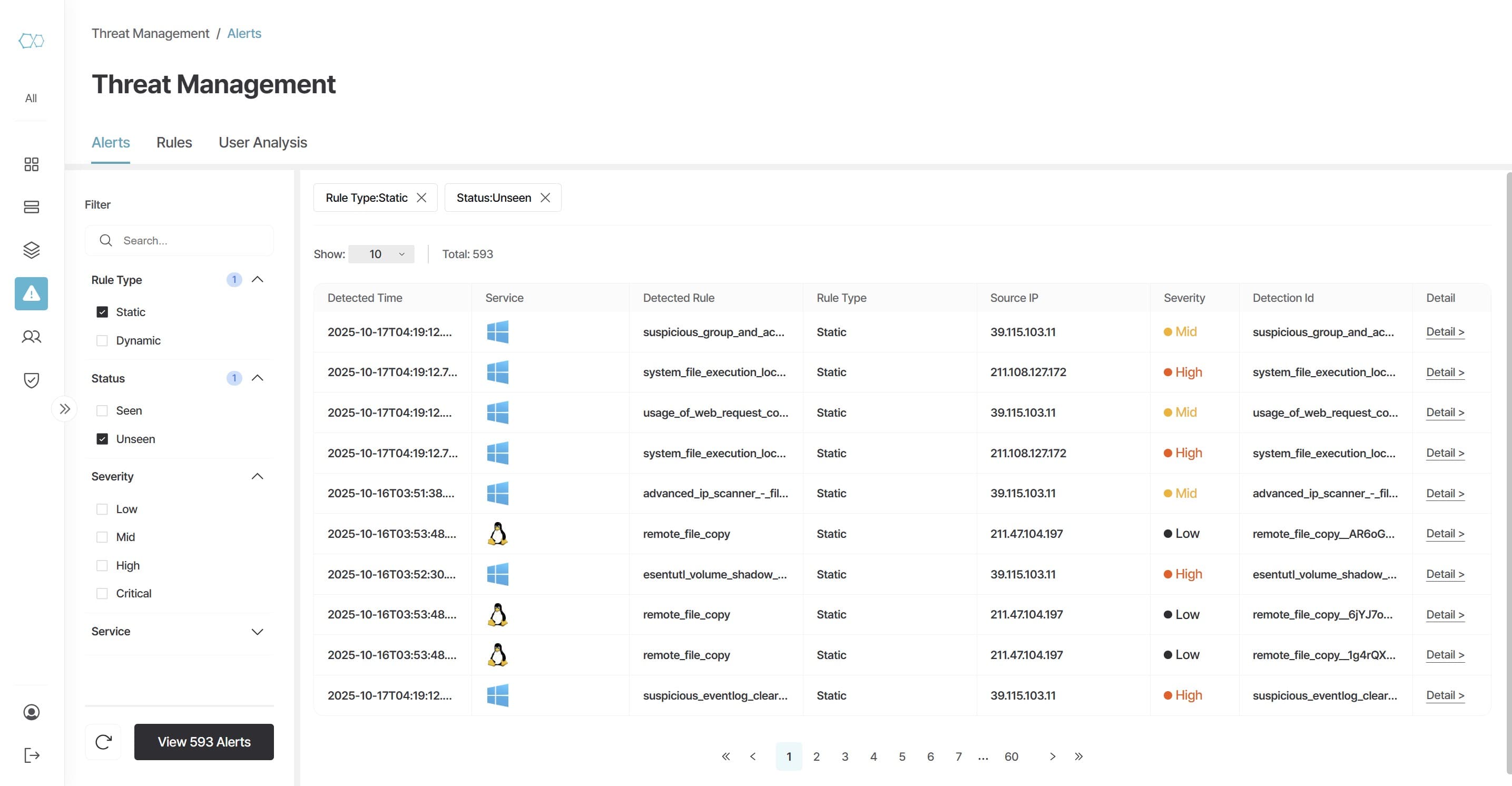
The Alerts tab is the core security operations screen for viewing and analyzing threat events detected in real-time by Teiren Cloud SIEM. When a security event matching configured detection rules occurs, an alert is immediately generated, allowing administrators to quickly understand key information such as attack time, service, user/host, rule trigger cause, and severity.
Main Features
1. Detection Event Monitoring (Alert Table Overview)
All detected security events are recorded in real-time. From single login failures to complex attack behavior flows, they are visually displayed to intuitively understand attack paths.
2. Powerful Search and Filtering
Search detection history with desired conditions through the left Filter panel. Supports AND operations between top categories like Rule Type, Status, Severity and OR operations between sub-options for multi-combination searches.
Key Benefits
| Category | Content |
|---|---|
| Real-time Threat Awareness | Instantly verify log-based detection results through alerts |
| Intelligent Classification | Single action and behavior chain detection through Static/Dynamic rules |
| Immediate Response | Enable fast security decisions through Severity-based priority classification |
Summary
| Category | Content |
|---|---|
| Detection Types | Static (Single) / Dynamic (Correlated Behavior) |
| Filter Structure | Rule Type / Status / Severity / Service |
| Data Refresh | Real-time updates |
Rules
Feature Description
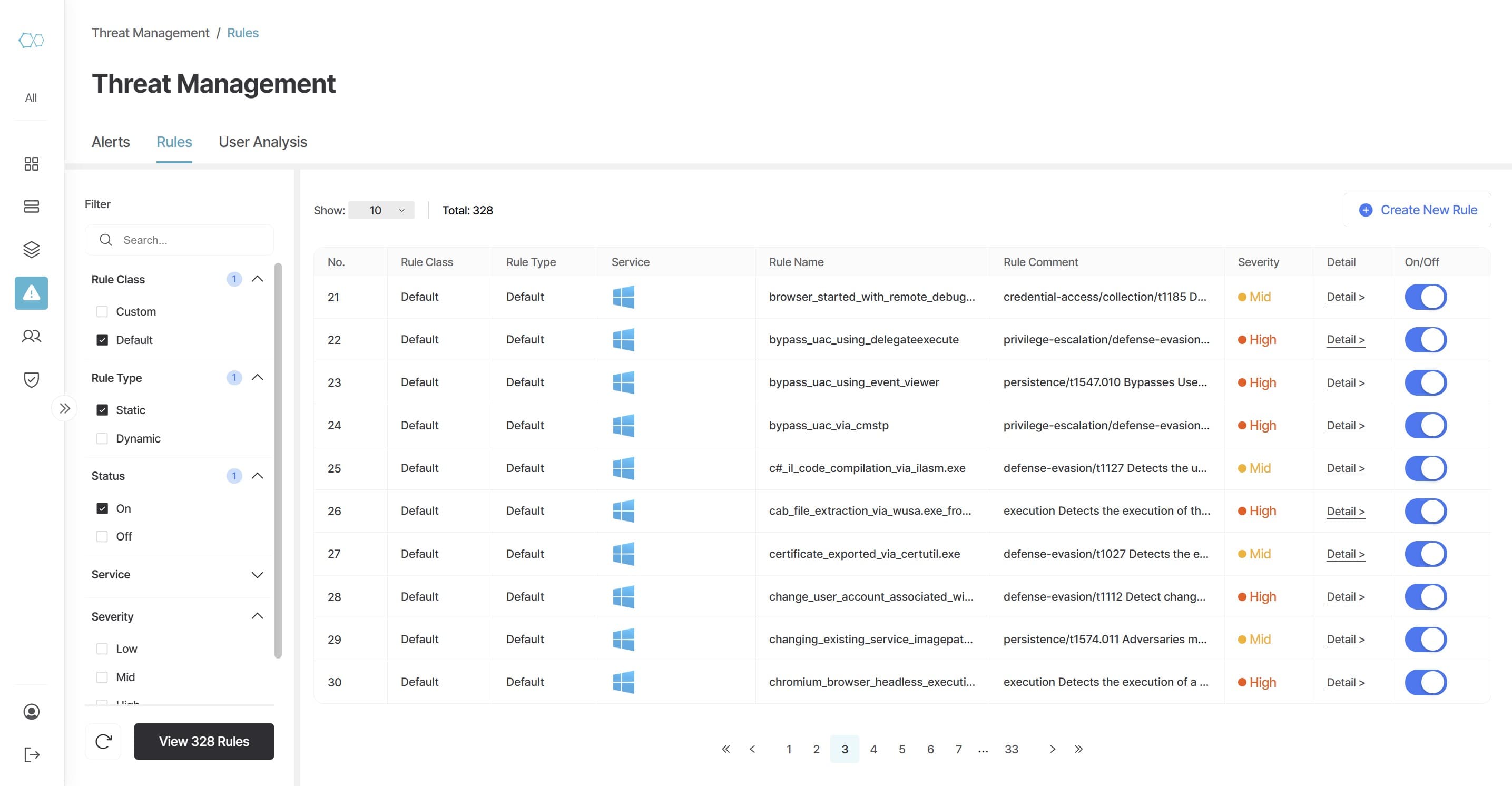
The Rules tab is the core page for creating, managing, and controlling threat detection policies in Teiren Cloud SIEM. Here you can define what behaviors the system detects as "threats" and see the operational status of detection policies at a glance. In addition to the provided Default Rules, administrators can create Custom Rules directly or build optimized detection policies through free customization services.
Main Features
1. Rule Status Management (Rule Table Overview)
View all registered detection policies at a glance including classification, type, applied service, description, and severity, and control them with On/Off switches.
2. Security Policies (Static / Dynamic)
Supports both Static Rules for capturing immediate anomalies (single event detection) and Dynamic Rules for detecting attack context based on temporal and behavioral correlations (correlated behavior detection).
Key Benefits
| Category | Content |
|---|---|
| Ready-to-Use Default Rules | Hundreds of detection rules automatically applied upon installation |
| Sophisticated Detection Structure | Complex detection support based on Static + Dynamic rules |
| Free Custom Rule Development | Customized detection policies tailored to customer environments |
Summary
| Category | Content |
|---|---|
| Detection Policy Types | Static / Dynamic |
| Default Rule Configuration | Default Rules (Provided by Teiren) |
| Custom Rules | Custom Rules (Create directly or request free development) |
User Analysis
Feature Description
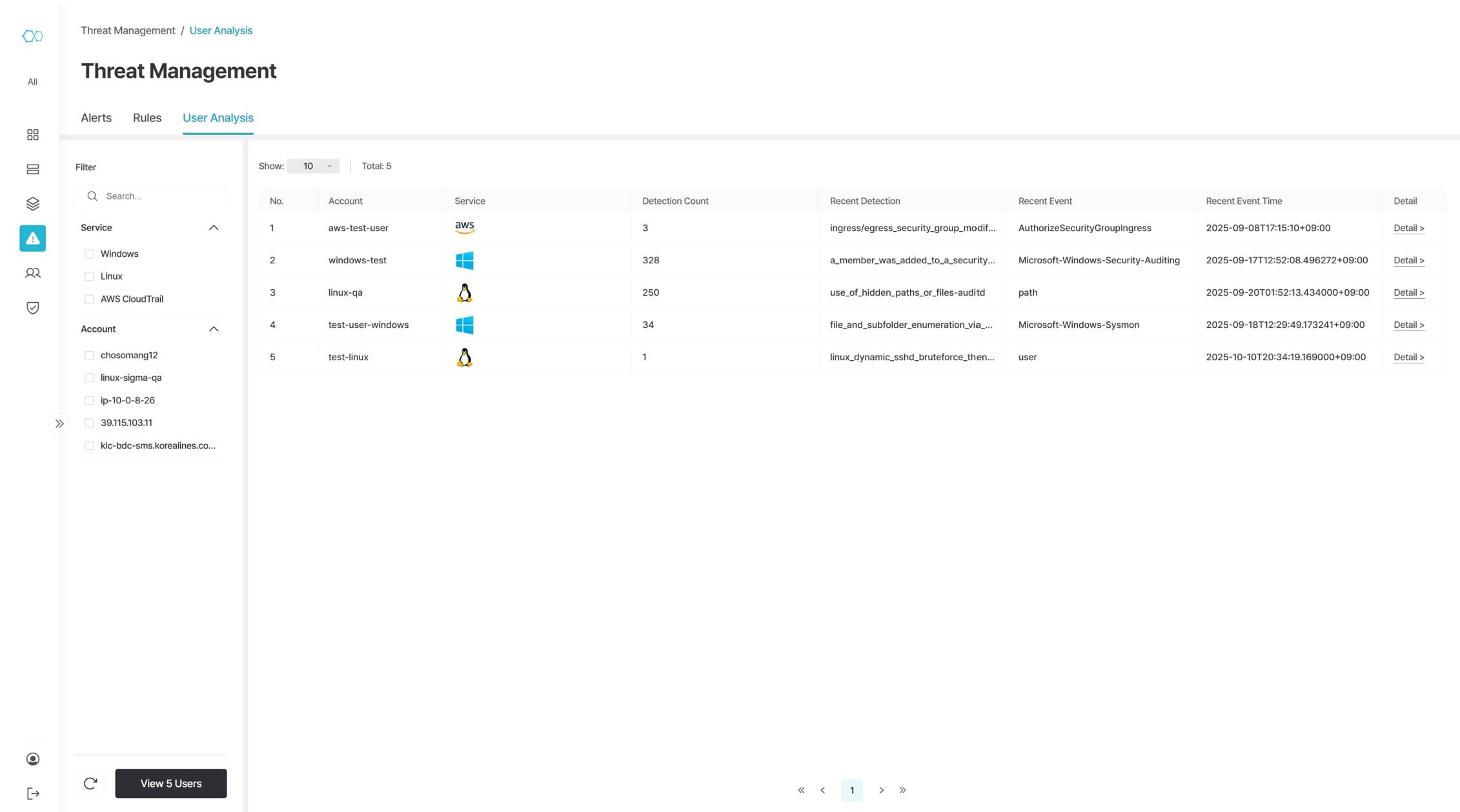
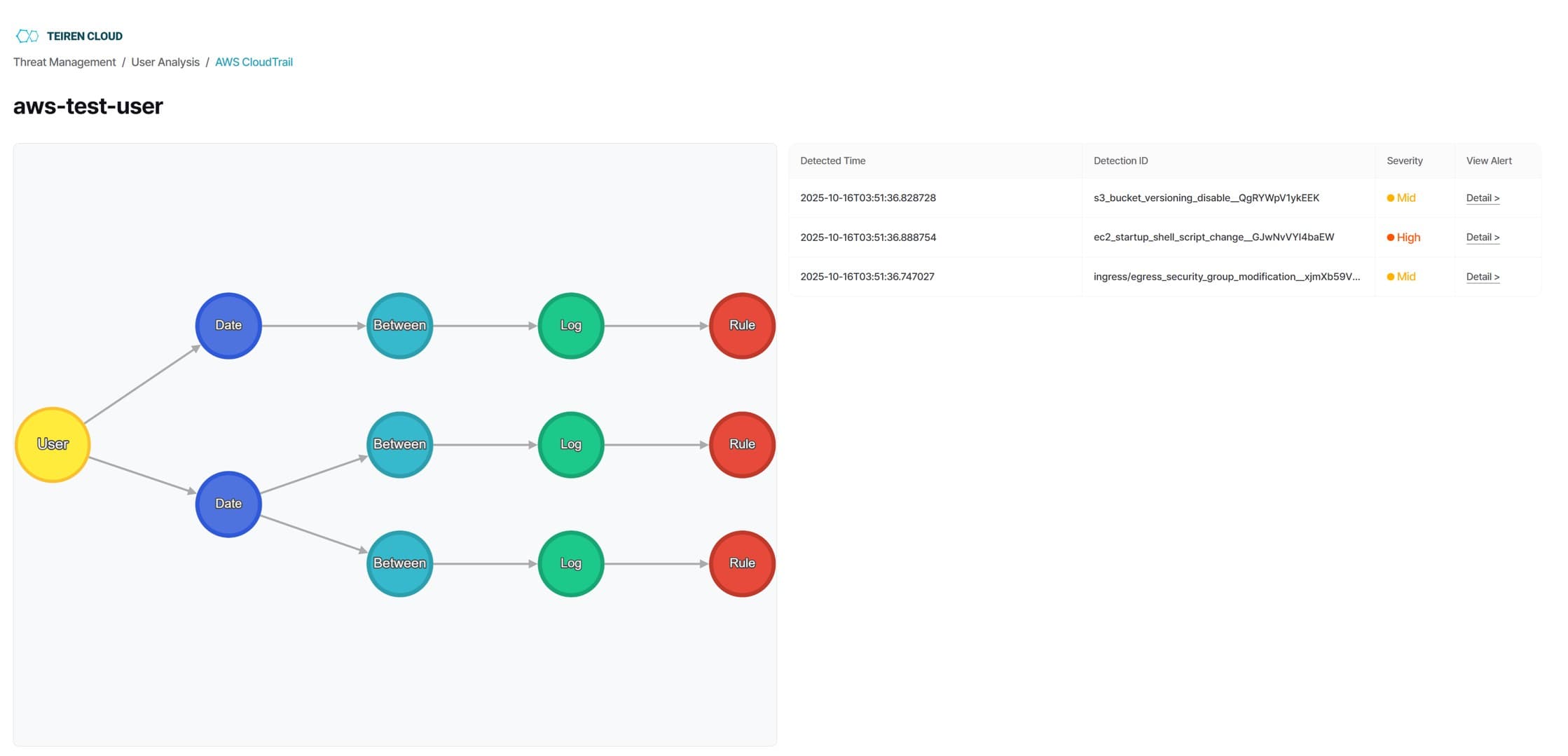
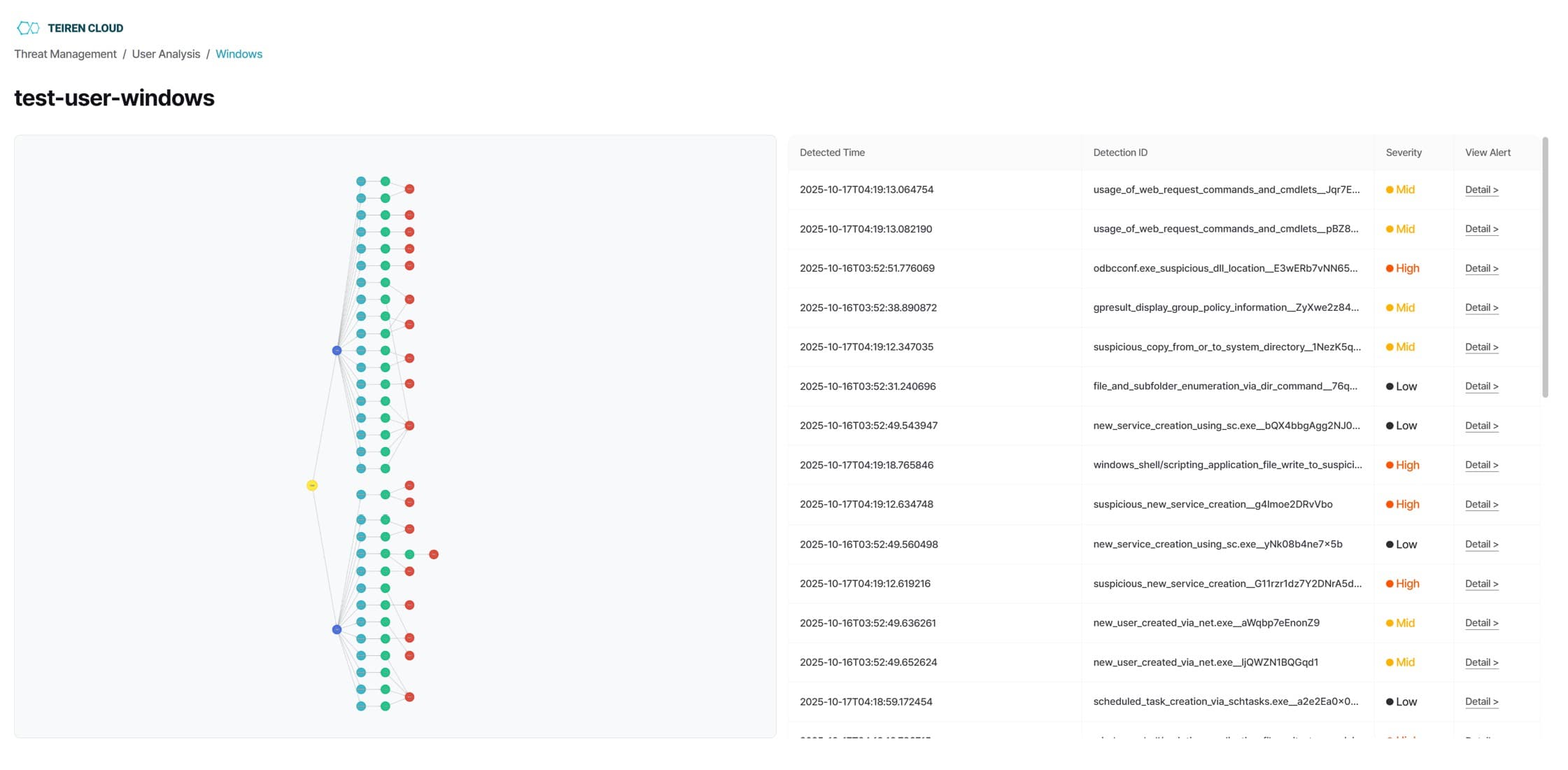
The User Analysis tab is a feature that enables integrated analysis of threat events from the user perspective. Unlike traditional SIEMs that provide information centered on logs and events, Teiren visualizes user-level activity flows in a graph-based format, enabling intuitive understanding of the context and relationships of threat behaviors.
Main Features
1. User and Entity Behavior Graph
When selecting a specific user, threat events from that account are visualized in a graph-based format (User → Date → Log → Rule flow). Not only single events but also correlated behavior-based detection records can be verified within user-level context.
Key Benefits
| Category | Content |
|---|---|
| User-Centric Threat Visibility | Analysis by user, time, and behavior units rather than simple events |
| Behavior-Based Analysis | Understanding attack behavior chains rather than individual alerts |
| Multi-Service Integrated Monitoring | Integrated analysis of Windows, Linux, and Cloud account logs |
Summary
| Category | Content |
|---|---|
| Analysis Target | User-level threat analysis |
| Analysis Method | Graph-based behavior flow + Detailed log analysis |
| Primary Purpose | User behavior-based threat detection/investigation and incident response |